How to design your product page for AI shopping agents
An AI shopping agent reads your product page twice: as data to shortlist you, then it sends a buyer to that same page to close. Here's how to design for both readers.
An AI shopping agent reads your product page twice. First as structured data, to decide whether you make its shortlist. Then it hands a pre-qualified shopper to that same page to actually buy. You're designing for two readers now: clean, real-time data the agent can parse, and instant visual proof the human needs to close. Most advice only covers the first half.
A shopper opens ChatGPT and types "best linen shirts for hot weather under $80." Back come three products, each with a photo and a line on why it fits. She taps one. It opens your product page. She buys, or she doesn't, in about three seconds.
She never saw a search results page. She never browsed your store. The agent did the shortlisting, and your page got handed a customer who is already most of the way to yes.
This is not a small shift. Over the 2025 holiday season, traffic to US retail sites from AI sources jumped 693% year over year, and those shoppers converted 31% more than visitors from other sources. They arrive warmer because something already vouched for you.
Here's the part that makes designing for it tricky: the two biggest engines can't agree on where the buying happens. In March 2026, OpenAI pulled back from its in-chat Instant Checkout and started routing shoppers to merchant websites to finish the purchase, in its own words "allowing merchants to use their own checkout experiences while we focus our efforts on product discovery." Google went the opposite way, building in-chat carts and direct buying into AI Mode and Gemini through its Universal Commerce Protocol.
So you can't bet your sale on checkout living in one place. The one surface both routes run through is your product page and the data behind it. That's what you design for.
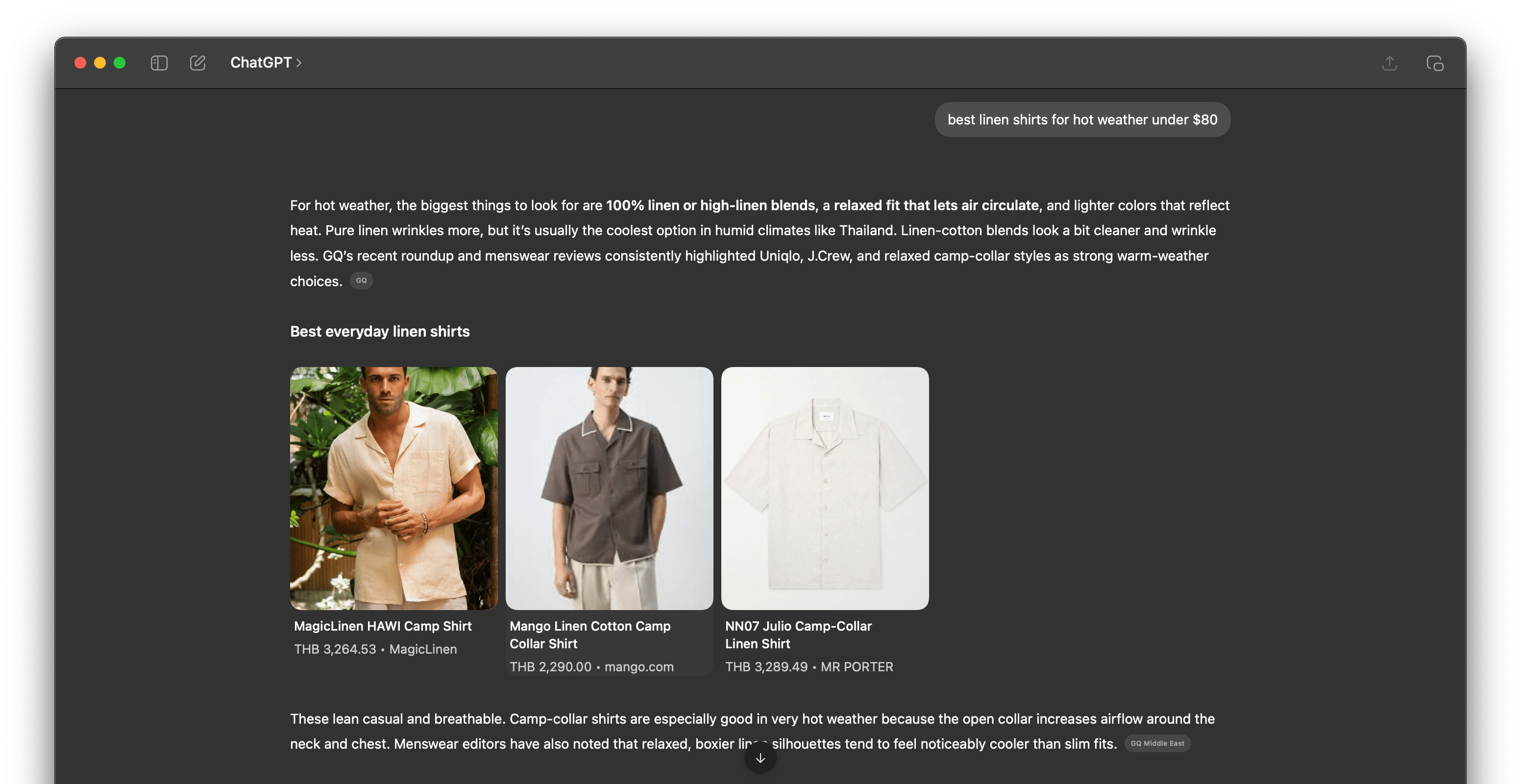
A real query returns a ranked shortlist, each product with an image, a price, and a reason. The shopper taps through from here.
What an AI shopping agent actually reads
Not your layout. Not your hero video. The agent reads structured data: your product title, price, availability, attributes, and image fields, mostly pulled from your product feed and your on-page markup.
When someone asks ChatGPT a shopping question, OpenAI says results are organic and unsponsored, ranked on relevance. When several merchants sell the same product, it weighs availability, price, quality, whether you're the primary seller, and whether you've enabled checkout. Google's protocol goes further and lets agents pull real-time variants, inventory, and pricing straight from your catalog at the moment of the question.
Read that list again. Almost all of it is data hygiene. Is the price right, right now? Is it actually in stock? Are the attributes complete enough that the agent is confident you match "linen" and "under $80" and "hot weather"? A page that looks beautiful to a human but ships stale or thin data to the agent doesn't make the shortlist, and you never find out why.
The handoff almost nobody designs for
Say you make the shortlist. The agent sends the shopper to your page. This is the moment the "optimize for AI" guides go quiet, and it's the moment the sale is actually won or lost.
The person landing on your page is not a cold visitor. An agent just told them you fit. They're carrying an expectation: this is the linen shirt, around this price, that does the thing I asked for. Your page has about three seconds to confirm all of that, or the trust the agent built collapses.

The agent's pick, straight from that shortlist.
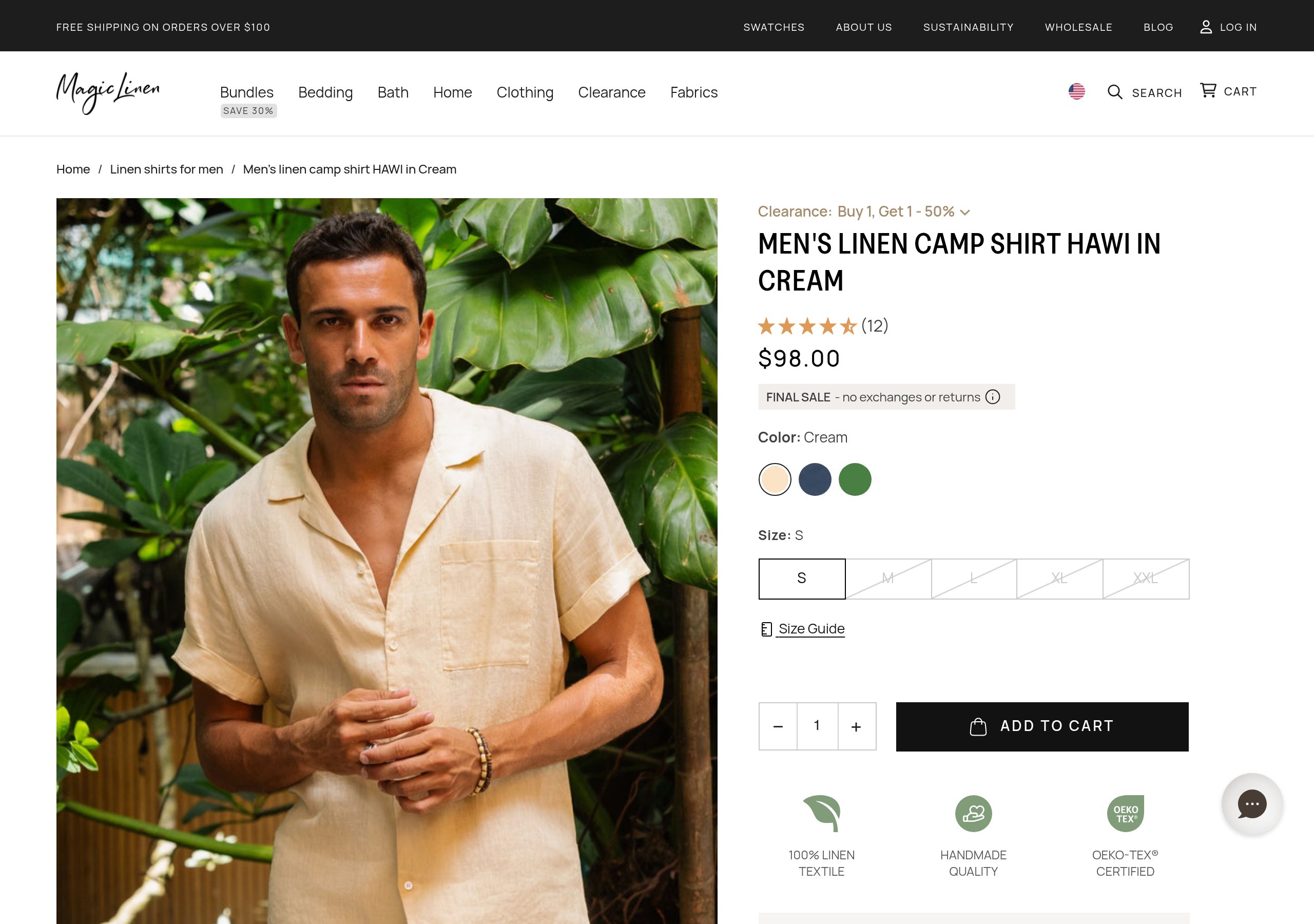
The page it hands the shopper to. The sale survives only if this instantly reads as the same shirt the agent promised.
The ways it collapses are boring and common:
The price doesn't match. The agent quoted $69, the page says $79 after a sync lag. Now the shopper doesn't trust either of you.
The product looks different. The agent showed a clean studio shot; the page leads with a dim, busy photo. Same item, but the shopper can't instantly confirm it, so they hesitate.
They can't tell it's the same thing. No clear hero, no angle that matches what the agent showed, no detail shot to verify the material. Verification fails, and they bounce back to the chat to tap a competitor.
You won the hard part. The agent picked you out of the whole web. Then a price typo or a weak photo gave the sale back. Designing for the handoff means the page reads as a confirmation of the chat, not a fresh pitch.
The data layer: getting onto the shortlist
This half is well covered everywhere, so I'll keep it tight. It's table stakes, not an edge, but skip it and nothing else matters.
Feed hygiene. Accurate, complete product data, refreshed often. OpenAI's feed accepts updates as often as every 15 minutes; use that for anything with moving prices or stock.
Real-time price and availability. The single most common way to fall out of the shortlist, or break the handoff, is data that's even slightly stale. Treat price and stock accuracy as the priority, not a nice-to-have.
Product schema. Clean
Productstructured data on the page (price, availability, brand, GTIN, attributes) so engines that read the page, not just the feed, understand it.Complete attributes. The agent matches on specifics. Material, fit, color, use case. Thin attributes mean you only match vague questions, and the specific ones are where buying intent lives.
The image fields. Your photos ride in
image_linkandadditional_image_link. This is its own deep topic, and I wrote the full version separately: your product photos decide whether AI recommends you.
Most of that is invisible to a human and the whole point to an agent. Here's the shape of a trimmed Product block, the kind of structured data an agent reads before it ever decides to show you:
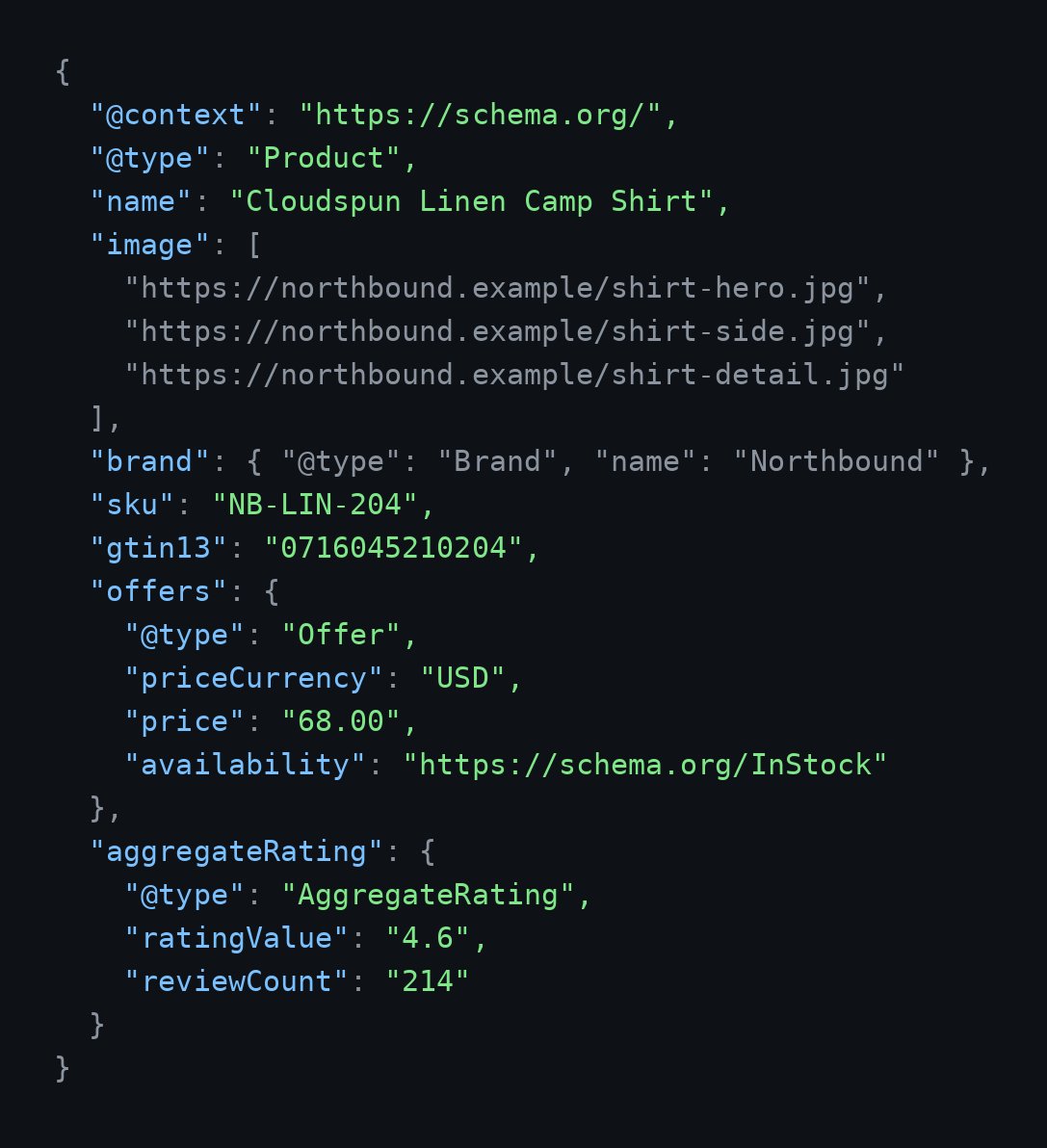
A trimmed Product block. Every field the agent weighs, in one place.
Nothing fancy. But notice every field the agent weighs is right there: price, availability, brand, the image set, the rating. Leave one blank and you're a weaker candidate than the brand that filled it in.
The trust layer: closing the human the agent sends
This is the half the feed and schema crowd skips, because it isn't their job. It's the visual and trust work that turns a handed-off shopper into a sale, and it's where a product brand can actually win.
The fastest thing a page can do for a skeptical, pre-qualified visitor is look like the thing they were promised. That means a clean hero that matches what the agent showed, then the supporting set that lets them verify without thinking: a few angles, a close-up of the material, a shot that shows scale, one in context. The same five-shot set that helps the agent recognize you is what reassures the human, which is a nice coincidence worth leaning on.
Then the rest of the confirmation:
Price parity with the chat. Whatever the agent quoted should be what they see, instantly. No surprise shipping math above the fold.
Specs that match the claim. If the agent said "100% linen," that should be the first attribute they see, not buried under a fold of marketing copy.
Proof that you're real. Reviews, ratings, a returns line. The agent vouched for fit; social proof vouches for you as a seller.
None of this is exotic. It's just owned by a different part of the brain than feed management, and most "prepare for AI shopping" checklists never reach it.
Two protocols, going opposite directions
It's worth understanding the split, because it tells you what's stable and what isn't.
OpenAI's Agentic Commerce Protocol powered in-chat Instant Checkout, then OpenAI scaled that back in March 2026 toward discovery, routing the actual purchase to your site. Onboarding merchants and keeping product data accurate turned out to be harder than expected.
Google's Universal Commerce Protocol is pushing the other way, into in-chat carts and direct buying across AI Mode and Gemini, with a Universal Cart and real-time catalog pulls, backed by Shopify, Etsy, Target, Walmart, and others.
Two giants, opposite bets on where checkout lives. The lesson isn't to pick one. It's that the checkout layer is a moving target, and the thing both protocols depend on is the same: accurate, structured product data and a page worth landing on.
For most small brands, the practical answer is calmer than the headlines. You probably won't implement either protocol yourself. Your platform will, Shopify already sits inside both, so your job is upstream of the protocol fight: get the data clean and the page right, and you're ready for whichever way checkout swings.
What I'd fix first with one week
If I had a single week and a normal-sized catalog, in order:
Audit price and availability accuracy. Pull your feed, spot-check it against your live store, and fix the sync. This protects both the shortlist and the handoff, and it's usually the cheapest fix with the biggest payoff.
Get a real image set on your top sellers. Clean hero, a few angles, a material close-up, a scale cue, one lifestyle shot. Start with the products that already sell, since those are the ones the agent is most likely to surface.
Complete your attributes and
Productschema. Fill the specifics that let you match high-intent questions, and mark them up so on-page readers get them too.Make your page confirm the chat. Check that your hero, price, and lead specs would reassure someone who was just told you're the answer. If there's a gap between the promise and the page, close it.
Notice what's not on the list: implementing a commerce protocol. That's downstream, it's mostly your platform's job, and it changes every quarter. The data and the page are the parts you own and the parts that last.
FAQ
Can people still buy products inside ChatGPT?
Some, but it narrowed. OpenAI scaled back its in-chat Instant Checkout in March 2026 and now routes most shoppers to the merchant's own site to complete the purchase, focusing ChatGPT on product discovery. Google is moving the other way, expanding in-chat carts through its Universal Commerce Protocol. Either way, your product data and your page are what the engines depend on, so that's where to put the work.
Do I need to implement the Agentic Commerce Protocol or UCP myself?
Most brands won't, directly. If you're on a major platform like Shopify, the protocol support comes through the platform. Your job is upstream: accurate feed data, complete attributes, clean schema, and a product page that closes the shopper an agent sends you.
Is SEO dead for ecommerce?
No, it moved. Less about ranking ten blue links, more about feeding structured data an agent can parse and owning the page it hands a buyer to. The skills overlap, the surface changed.
What's the one fix that matters most?
Real-time price and availability accuracy. Stale data is the most common reason you fall out of the shortlist or lose the handoff, and it's usually a fixable sync problem rather than a big project.
How is this different from answer engine optimization?
AEO is about getting recommended in the first place. This is about that plus the moment after: designing the page for the human the agent sends over, so the sale you already half-won actually closes.
The takeaway
The checkout layer is going to keep moving. OpenAI pulled it back to your site, Google is pulling it into the chat, and that line will shift again before the year is out. Chasing it is a treadmill.
Your product page and the data behind it are the constant. Get the data right so the agent picks you. Get the trust right so the human the agent sends actually buys. Most brands are doing neither yet, which is the whole opportunity.